
Split to Succeed: Crafting Train-Test Datasets for Optimal fine-tuning of an LLMs
Originally published on Medium

Photo by Anthony Intraversato on Unsplash
Why “train” & “test” datasets
When fine-tuning or training a model, a crucial practice is monitoring the learning curve to determine if it is overfitting or diverging too much. To do this, we calculate the accuracy and loss to determine the model’s performance. (If you like to learn more about learning curves, read A Deep Dive Into Learning Curves in Machine Learning.)
To calculate these metrics, we need a train and a test dataset. When using a custom dataset (Structuring Datasets for Fine-Tuning an LLM), we must split the dataset into a train and a test dataset. The idea is to have a dataset the model did not see during the training or fine-tuning cycles. Calculating the accuracy helps us identify when the model overfits the training dataset and when the accuracy curve of the test dataset starts diverging too much from the accuracy curve of the training dataset.
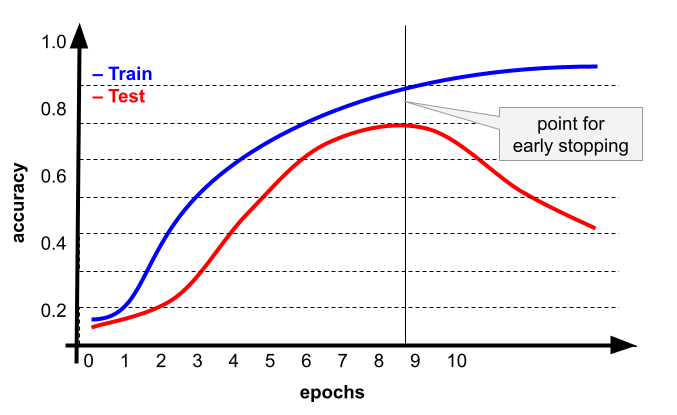
A learning curve of accuracy over epochs illustrating the point for early stopping.
When a steep divergence between the accuracy of the training and test dataset is seen, the training or fine-tuning process should be stopped. Another advantage of the “early stopping” technique is that it avoids unnecessary training cycles from utilizing the GPUs after the model has reached its best performance with the available training data.
Creating “train” and “test” dataset
There are many techniques for splitting an existing dataset into a train and test dataset. Fortunately, nowadays, most libraries provide a native option. In this case, I will use the “datasets” library from Hugging Face to split a custom dataset hosted in the Hugging Face hub.
from datasets import load_dataset

# Download the dataset
dataset = load_dataset("boricua/qna-ocp-4.15")
In this case, I’m fetching a dataset that does not have a train and test split. Another issue to fix with this dataset is the “Question” and “Answer” should be formatted for the desired prompt into a single column. A common practice is to call this combined prompt the “text” field.
from datasets import load_dataset

# Combine 'question' and 'answer' into a single 'text' field
def combine_qa(local_dataset):
    local_dataset['text'] = f"User: {local_dataset['Question']}\nAssistant: {local_dataset['Answer']}"
    return local_dataset

####################################################################################
# main
####################################################################################
if __name__ == '__main__':
    # Download the dataset
    dataset = load_dataset("boricua/qna-ocp-4.15")

    # Combine Q&A into a single 'text' column and
    # keep the "train" dataset out of the DatasetDict
    dataset = dataset.map(combine_qa)['train']
    dataset.remove_columns(["ID"]) # remove the ID column (index from original dataset)

    # Split the dataset
    split_dataset=dataset.train_test_split(test_size=0.1) # 10% for test

    # Print some statistics
    print(f"Total examples: {len(dataset)}")
    print(f"Training examples: {split_dataset['train'].num_rows}")
    print(f"Test examples: {split_dataset['test'].num_rows}")

    # Save the datasets as Huffing Face format
    print("Saving train and test datasets saved to disk.")
    split_dataset['train'].save_to_disk("qna_ocp_train")
    split_dataset['test'].save_to_disk("qna_ocp_test")

    # Save the datasets in parquet formats
    split_dataset['train'].to_parquet("qna_ocp_train.parquet")
    split_dataset['test'].to_parquet("qna_ocp_test.parquet")
Line 13 fetches the dataset. Then, I use a simple “combine_qa” function to combine the “Question” and “Answer” domains in a prompt compatible with fine-tuning a model for chat interactions.
When a dataset does not contain a train-test split, the “load_dataset” function creates a DatasetDict object and allocates the whole dataset under the “train” key. For this reason, line 17 only reads the “dataset” object under the “train” key. Line 21 uses the dative “train_test_split” function to generate a dataset that splits the dataset into a “train” and “test” dataset with the “test_size” parameter indicating the percentage of samples to allocate for a “test” dataset. These samples are randomly selected from all available entries to maintain a similar distribution and composition as the original dataset.
Lines 29 to 35 show two methods of storing the newly created split. It can be saved to disk (lines 30 and 31), which creates a directory structure for the data, or a Parquet-formatted dataset (lines 34–35). Both formats (and other available formats) can be used during fine-tuning.
Closing Remarks
Creating a “train” and “test” dataset to use during the training of an AI is a standard best practice in machine learning. Native implementations of the “train_test_split” function are available in packages like Sciti-Learn, Keras, PyTorch, and others. For advanced or multi-modal datasets, you may want to create your train_test split functions.
The train-test split enables the validation of the model during training or fine-tuning, which is the basis of early stopping techniques. On the other hand, while early stopping is one technique to prevent overfitting or underfitting a model, it might not be as easy to apply when fine-tuning an LLM, but it is even more critical.
When fine-tuning, we do not have the original training dataset for the model. Because of this, it can be challenging to implement or interpret a validation test during the fine-tuning process of an LLM because it uses “new” samples that were not seen or available during the initial training phase. Seeing new samples beyond the areas for which the model was initially trained provokes hallucinations (as demonstrated by researchers in the paper Does Fine-Tuning LLMs on New Knowledge Encourage Hallucinations?), and further fine-tuning fine-tuned models leads to the LLM forgetting acquired knowledge (as investigated in the paper Model Collapse Demystified: The Case of Regression). In these scenarios, train-test splits of the fine-tuning dataset will help guide the fine-tuning cycles even when the model could forget knowledge from other areas outside its fine-tuned domain.
As we can see, there is much more domain-specific validation we have to do when fine-tuning an LLM, and all this begins with having a good train-test split of the original dataset.
Before fine-tuning your LLM, ensure your “test” or validation dataset has the same composition and distribution as the original dataset. In summary, split to succeed. Happy splitting!