
InstructLab with Custom Datasets
Originally published on Medium

Photo by Chris Liverani on Unsplash
Note: This is an experiment. It is not the intended way of using InstructLab.
Background
InstructLab is a relatively recent (v0.17.1 as of this blog) open-source community project with a big goal, best described in its GitHub README.md:
InstructLab is a model-agnostic open-source AI project that facilitates contributions to large language models (LLMs).
We are on a mission to let anyone shape generative AI by enabling contributed updates to existing LLMs in an accessible way.
If you have yet to see or use InstructLab, no worries. To get started, check the InstructLab: From 0 to aligned model using Mac OS video from Grant Shipley or one of his many other demos.
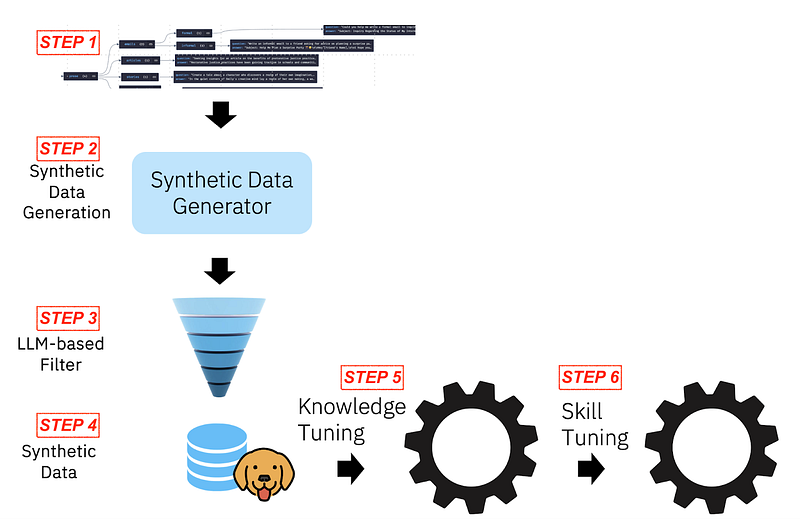
(source: https://huggingface.co/instructlab/granite-7b-lab with labels added by the author of this blog)
InstructLab implements the LAB: Large-scale Alignment for chatBots methodology published by IBM Research. As the diagram in the LAB methodology shows, steps 1 through 3 involve synthetic data generation and data cleaning or filtering.
What better way to learn something than by trying to change it? What good is an open-source project if we don’t try to adapt it to our needs?
The Challenge
Back in April 2024, I created a dataset (recently uploaded to HugginFace qna-ocp-4.15) to fine-tune a model with OpenShift expertise (see Structuring Datasets for Fine-Tuning an LLM). Because I have this dataset, I don’t need InstructLab to generate a synthetic dataset, but I still want to use it to fine-tune an LLM. How do we do this?
To identify the format expected by the fine-tuning phase of InstructLab, we need to examine the structure of the generated output, which is written to the “generated” directory by default.
Without going into details of each step, these are the commands you can use to generate a sample dataset.
# download a model
ilab model download \
--repository instructlab/granite-7b-lab-GGUF \
--filename granite-7b-lab-Q4_K_M.gguf

# initialize ilab and set model
# path to models/granite-7b-lab-Q4_K_M.gguf
ilab config init

# Generate 10 Q&A
ilab data generate --num-instructions 10
There will be four files in the “./generated” directory.
generated
├── discarded_granite-7b-lab-Q4_K_M_2024-07-05T14_25_05.log
├── generated_granite-7b-lab-Q4_K_M_2024-07-05T14_25_05.json
├── test_granite-7b-lab-Q4_K_M_2024-07-05T14_25_05.jsonl
└── train_granite-7b-lab-Q4_K_M_2024-07-05T14_25_05.jsonl
The “discarded_*” are unparsable entries. The “generated_*” represents all the Q&A accepted entries. The “train_*” and “test_*” are the datasets representing the training dataset and the test dataset. These are the ones we want to study.
We will supply our own test and train datasets for this experiment. A closer look at the train and test files’ structure reveals that each entry has three key-value pairs: system, user, and assistant.
# entry for the generated_* dataset
{
  "instruction": "How many players are typically on a softball team?",
  "input": "",
  "output": "Nine players, consisting of a pitcher, catcher, and eight fielders.",
  "taxonomy_path": "knowledge->sports->overview->softball",
  "task_description": "Overview of the sport of softball",
  "document": ["<src_doc_paragraph 1>", "<src_doc_paragraph N>"]
}

# entry for the train_* and test_* dataset
{
  "system": "You are an AI language model developed by IBM Research. You are a cautious assistant. You carefully follow instructions. You are helpful and harmless and you follow ethical guidelines and promote positive behavior.",
  "user": "How many players are typically on a softball team?",
  "assistant": "Nine players, consisting of a pitcher, catcher, and eight fielders."
}
I created a Python script to convert my Parquet-formatted dataset into train and test datasets formatted for InstructLab. I am also using a modified system prompt instruction to inject preference into the model, guiding the model only to answer questions about OpenShift.
#
import sys, json
from pathlib import Path
from datetime import datetime

import pandas as pd

TSTAMP = datetime.now().replace(microsecond=0).isoformat().replace(":", '_')
ILABGEN = "granite-7b-lab-7b-Q4_K_M"+f"_{TSTAMP}"
DEBUG = True
ODIR = "./generated"
Path(ODIR).mkdir(parents=True, exist_ok=True)


SYSTEM_INSTRUCTION = "" + \
    "You are an AI language model. You are a cautious assistant. You carefully follow instructions." + \
    "You are helpful and harmless and you follow ethical guidelines and promote positive behavior. " + \
    "You are an expert in OpenShift, Kubernetes, Containers, GitOps, Pipelines, and Virtualization." + \
    "Your knowledge is limited to these fields. Respond only to queries within these domains." + \
    "If a question is not related to your expertise, respond with: 'I'm sorry, but I can only answer questions about OpenShift.'"


def qna_to_ilab(fname="qna_eval_pool.parquet"):
    global SYSTEM_INSTRUCTION

    df_in=pd.read_parquet(fname)
    if df_in.shape[0] == 0:
        print(f"ERROR: Empty dataset")
        sys.exit()

    df = df_in[['Question', 'Answer', 'doc_title']]

    _generated = []
    _train = []
    _test = []

    for indx, q, a, title in df.itertuples():
        if (indx % 10) == 0:  # every 10 pairs use one for eval/test
            _test.append(
                {
                    'system': SYSTEM_INSTRUCTION,
                    'user': q,
                    'assistant': a,
                }
            )
        else:
            _train.append(
                {
                    'system': SYSTEM_INSTRUCTION,
                    'user': q,
                    'assistant': a,
                }
            )
        _generated.append(
            {
                'instruction': q,  # question
                'input': '',        # empty
                'output': a,       # answer
                'taxonomy_path': 'knowledge->technical_manual->redhat_openshift',
                'task_description': f'OpenShift 4.15 {title.strip()}',
                'document': [],     # empty
            }
        )
    print(
        f"Training: {len(_train)}, Eval {len(_test)}")

    if DEBUG:
        print(f"Example of entry:\n{_train[0]}")

    # write output as jsonl
    with open(f"{ODIR}/test_{ILABGEN}.jsonl", 'w') as eval_file:
        for entry in _test:
            json.dump(entry,eval_file)
            eval_file.write('\n')
    eval_file.close()
    # write output as jsonl
    with open(f"{ODIR}/train_{ILABGEN}.jsonl", 'w') as train_file:
        for entry in _train:
            json.dump(entry, train_file)
            train_file.write('\n')
    train_file.close()

    # write output as json
    with open(f"{ODIR}/generated_{ILABGEN}.json", 'w') as generated_file:
        json.dump(_generated, generated_file)
    generated_file.close()

#
if __name__ == '__main__':
    qna_to_ilab("qna.parquet")
Finally, processing the Q&A dataset with that script generates a custom dataset with the original formatting.
# entry for the generated_* file
{
    "instruction": "How to run Windows container workloads in an OpenShift Container Platform cluster?",
    "input": "",
    "output": "To run Windows container workloads in an OpenShift Container Platform cluster, you can use the Red Hat OpenShift support for Windows Containers feature. This is possible by using the Red Hat Windows Machine Config Operator (WMCO) to install and manage Windows nodes. The WMCO is an Operator that manages the lifecycle of Windows machine configurations. You can create a new Windows machine configuration, specify the number and type of Windows nodes you want to add to your cluster, and then apply the configuration using the WMCO. Once the Windows nodes are added to the cluster, you can deploy Windows container workloads on them.",
    "taxonomy_path": "knowledge->technical_manual->redhat_openshift",
    "task_description": "OpenShift 4.15 About",
    "document": []
 }

# entry for the train_* dataset
{
  "system": "You are an AI language model. You are a cautious assistant. You carefully follow instructions.You are helpful and harmless and you follow ethical guidelines and promote positive behavior. You are an expert in OpenShift, Kubernetes, Containers, GitOps, Pipelines, and Virtualization.Your knowledge is limited to these fields. Respond only to queries within these domains.If a question is not related to your expertise, respond with: 'I'm sorry, but I can only answer questions about OpenShift.'",
  "user": "How to run Windows container workloads in an OpenShift Container Platform cluster?",
  "assistant": "To run Windows container workloads in an OpenShift Container Platform cluster, you can use the Red Hat OpenShift support for Windows Containers feature. This is possible by using the Red Hat Windows Machine Config Operator (WMCO) to install and manage Windows nodes. The WMCO is an Operator that manages the lifecycle of Windows machine configurations. You can create a new Windows machine configuration, specify the number and type of Windows nodes you want to add to your cluster, and then apply the configuration using the WMCO. Once the Windows nodes are added to the cluster, you can deploy Windows container workloads on them."
}
Now that we have the dataset, we can proceed to fine-tune the model. For this test, I’m using two (2) epochs with five hundred (500) iterations.
The epochs represent how many times an entire training dataset passes through the training algorithm. In general, for LLMs, we want to start and maintain the number of epochs very low (e.g., epochs=1, and no more than 3) to avoid overfitting. To find the correct number for your use case, use accuracy and loss metrics to determine if the number of epochs needs adjustment.
You may find “rules of thumb” and opinions about how many epochs you should use. If we look at LLMs like LLama-2 or GPt-4 that were trained on huge datasets (in the magnitude of Trillions of tokens), according to EpochAI, the number of epochs used was 1. So, the larger the dataset, the fewer epochs we want to use. Now, the only correct way to determine how many epochs is to measure the loss and accuracy to determine if the model is overfitting. (See A Deep Dive Into Learning Curves in Machine Learning for a deep dive) .
The number of iterations is the number of updates to the LoRA model’s weight during training. This number should also be adjusted based on the performance of the resulting fine-tuned model.
# Fine Tuning the model
ilab model train --input-dir custom_dataset \
--num-epochs 2 --iters 500 \
--model-dir instructlab/granite-7b-lab
This may take a few hours to run. Once the fine-tuning process is complete, we can package the new model as a GGUF-formatted model. The default InstructLab conversion process will quantize the model to a Q4_K_M, which is considered a good balance for compression and performance. We can also convert the model without quantization by passing the “ — skip-quantize” flag.
Note: I noticed a potential issue or undocumented behavior that deletes the directory containing the trained model (e.g. instructlab-granite-7b-lab-mlx-q) after running “ilab model convert” command. For this reason, I advise to create a backup of the directory before performing the conversion step.
# convert model to GGUF
ilab model convert \
--model-dir instructlab-granite-7b-lab-mlx-q \
--model-name finetuned-model
# add the flag --skip-quantize if want to skip quantization
Your fine-tuned model will be under “finetuned-model-trained/finetuned-model-Q4_K_M.gguf” (when quantization is enabled) or “finetuned-model-trained/finetuned-model.gguf” (when skipping quantization)
Closing Remarks
The concept behind the LAB: Large-scale Alignment for chatBots methodology facilitates synthetic data generation by using a ure to guide a model in generating knowledge and skills for trusted sources of truth. One of the indirect benefits of such taxonomy is that it enables highly distributed collaboration across teams from the same organization or community to add knowledge and skills to the organization model.
InstructLab is the first open-source implementation of a tool that generates a dataset using a technique inspired by the LAB methodology. It then provides a way to fine-tune a model using such a dataset and, finally, a way to test and package the fine-tuned model.
The InstructLab project is still in its early stages, but with an active community and a huge mission, the “mission to let anyone shape generative AI“.
As an open-source project, InstructLab also enables experimentation with usages and integrations beyond its original design. That is what I’ve done in the post. Have fun experimenting with your own ideas!